Choose by how much the message matters
Phones turn up in nearly every story set in the present, and screenwriting still has no single agreed way of showing what is on them. That is less of a problem than it sounds. A handful of layouts cover almost every case and readers know all of them. Choosing between them mostly comes down to how much the words matter and how many of them there are.
| Layout | On the page | Good for |
|---|---|---|
| In the action | A text from Leo: "did u send it". | One or two short messages, taken in at a glance |
| As dialogue | LEO (TEXT) above the message | A back-and-forth of several messages |
| INSERT | A cut to the screen, then BACK TO SCENE | Words the audience has to read exactly, such as an email or a post |
| SUPER | SUPER: "on my way" | Messages that float over the picture beside the actor |
Most scripts end up using two or three of these for different jobs. The examples on this page come from the family in Midnight, Pacific Time, the short script in our formatting guide, where Leo's text to his sister, "did u send it", is already part of the story.
A short message in the action
Most texts in most scripts take up a single action line. Quotation marks around the words keep the reader from hearing them as speech. Say who the message is from and give it exactly as it was typed.
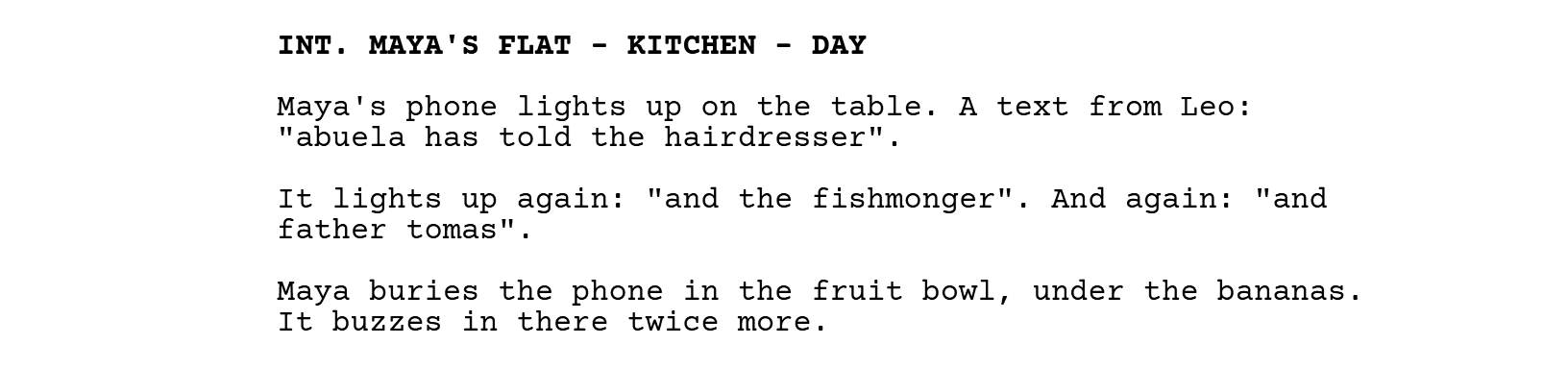
How a person texts tells the reader who they are, and it costs no extra lines. Leo writes in lower case and never ends on a full stop, while Maya punctuates even a one-word answer. Rosa signs every message "Abuela", in case the phone has forgotten who she is. Copy those habits exactly, typos included, and the reader will know who sent a message before they get to the name.
Some writers also set messages in italics. Nothing is lost either way, because the quotation marks have already told the reader nobody is speaking.
A conversation in texts
Once messages go back and forth, a paragraph of quotations gets hard to follow. Lay the exchange out like dialogue, with the sender's name as the cue, (TEXT) after it, and the message where the speech would go. A reader's eye already knows how to follow a conversation down that column.
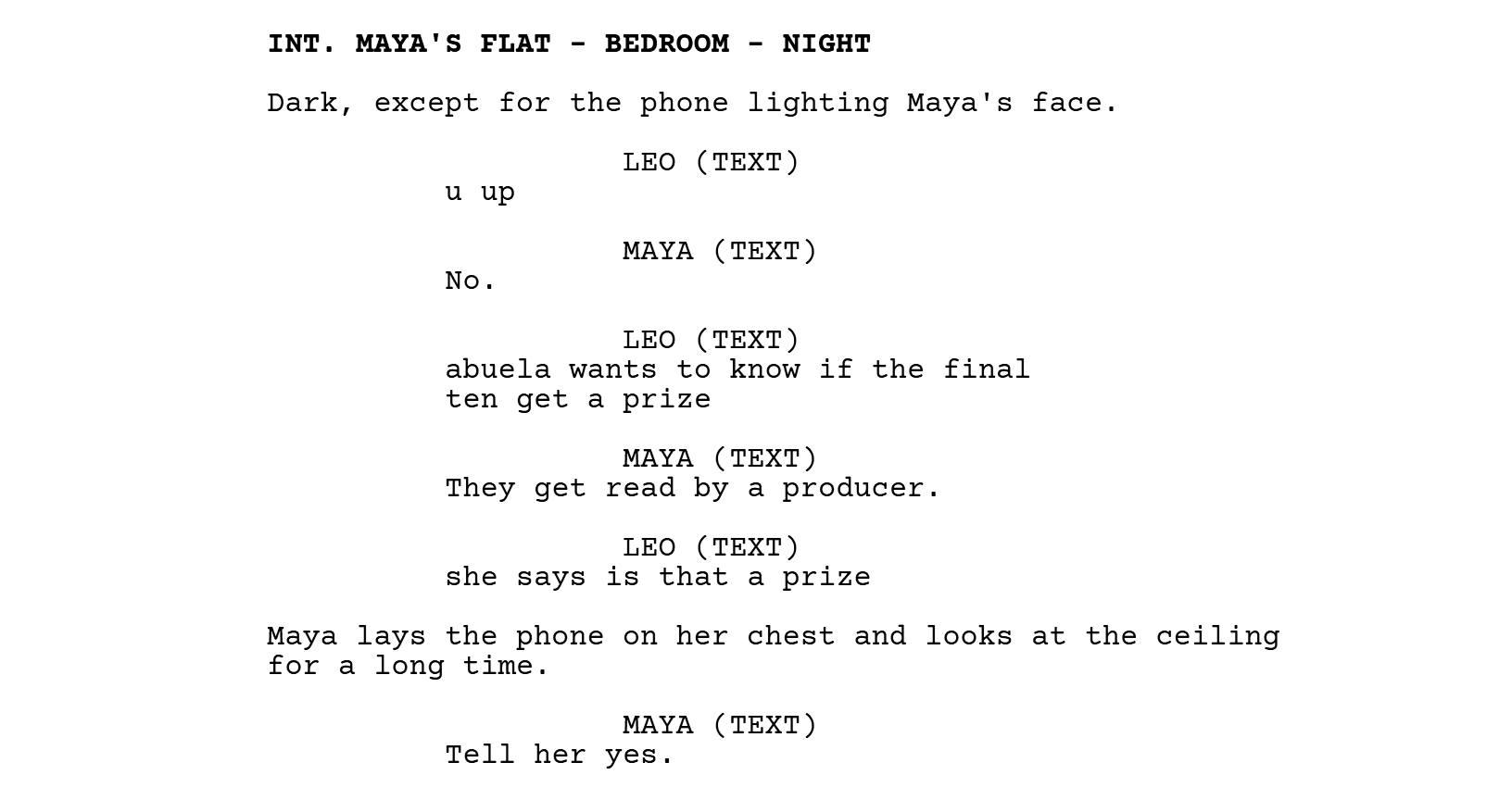
- (TEXT) or (TEXTING). Both are common. A few writers use (TEXTING) for whoever we watch typing and (TEXT) for messages that arrive, but most pick one and use it for everyone.
- The scene goes on around the messages. The moment Maya lays the phone on her chest is the biggest beat in that exchange, and it is an action line.
- Short exchanges play better. Watching someone read is slow. Past half a dozen messages, ask whether the conversation wants to be a call, or a scene with both people in the room.
- Texts read aloud. If the film will play the messages in the sender's voice, make the cue
LEO (V.O.)and say once in the action that his texts are heard.

In ScriptopusA text exchange is typed like any other speech. Put the name and (TEXT) on a Character line (Ctrl + 3, or Cmd + 3 on a Mac), press Enter, and the message goes straight into the dialogue column.
Showing the screen: INSERT and ON THE PHONE
When the audience has to read the exact words, cut to the screen. INSERT is the heading for it. Name the device in the heading and write what is on the screen below it; BACK TO SCENE brings us out again. Give the content in the order the audience will read it, and describe the layout only as far as the story needs.
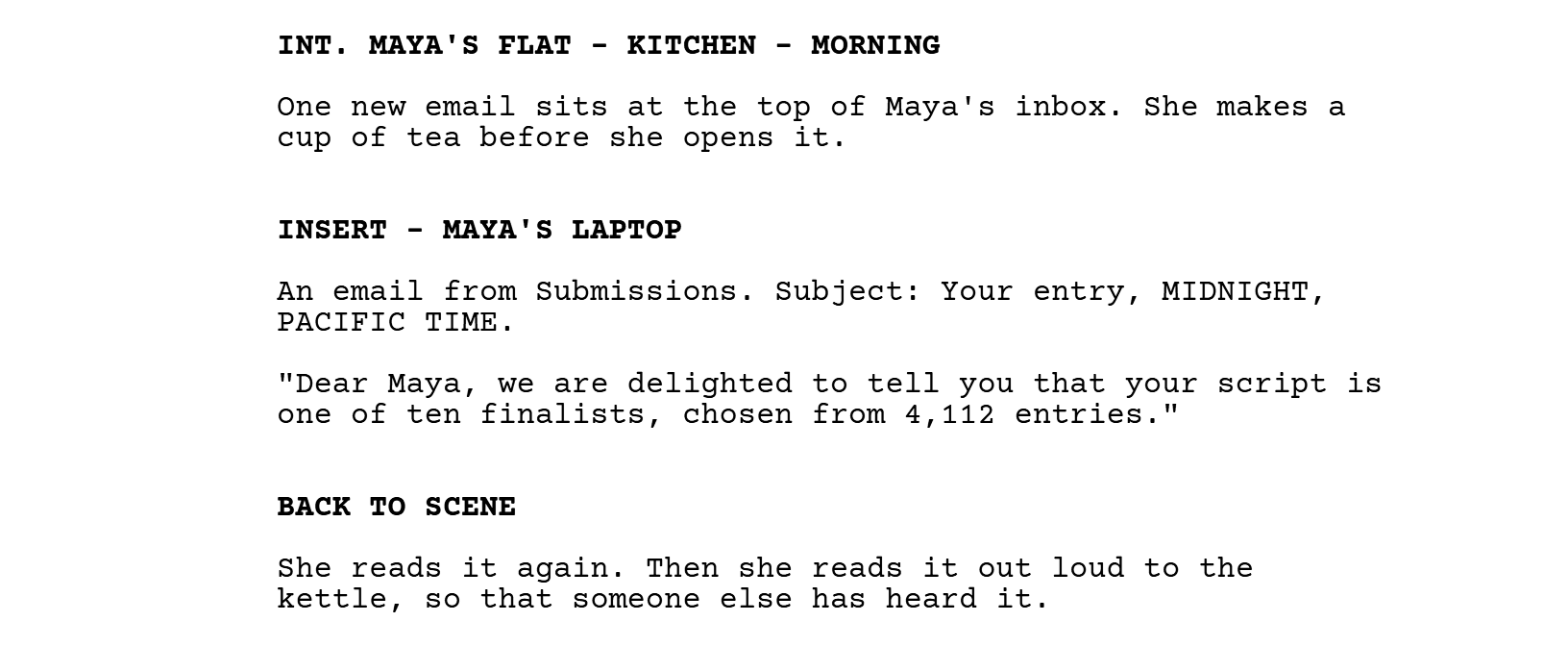
A lighter version puts a label at the start of an action line, ON MAYA'S PHONE: or ON THE LAPTOP:, followed by the words. It suits a single line, and needs no way back. Between them, the two layouts cover everything else that lives on a screen.
- Emails. The sender and the subject, then only the lines the audience needs. Leave the signature out.
- Social posts. Who posted, what the picture shows, the caption, and the number of likes only if the number is the point: Rosa's first post ever, a blurred photo of the printed script on her kitchen table. "MY GRANDDAUGHTER". Two likes.
- Search results. What was typed and the one result that matters: She types "how long do finalists wait". The top result is a forum thread called "Still waiting, week 9".
- A locked screen. The preview on a locked phone shows the start of a message and hides the rest. Often it is the most dramatic way to see one, especially when the wrong person picks up the phone.
Messages over the picture
Many films and series now float messages in the frame beside the actor instead of cutting to a close shot of a phone. The BBC's Sherlock made the look familiar in 2010, and House of Cards did the same in the US a few years later. On the page it is a SUPER, the same label that puts a date or a city over an opening shot, or ON SCREEN: at the start of the action line.
If the whole script works this way, say so once, the first time it happens: Throughout, texts appear on screen beside the phone. After that, each message can be a SUPER with its words in quotation marks, and nobody stops to ask whether this one is different. The look of the bubbles and how long each one stays up are decided later, in post-production, so the page only needs the words and the moment they arrive.
Typing, deleting, sending
Phones also let a story show a message that never gets sent. The audience reads what the character wants to say, watches it disappear, and then sees the careful version that gets sent. For that to work, every draft has to be on the page, each in quotation marks, with the deleting written as action.
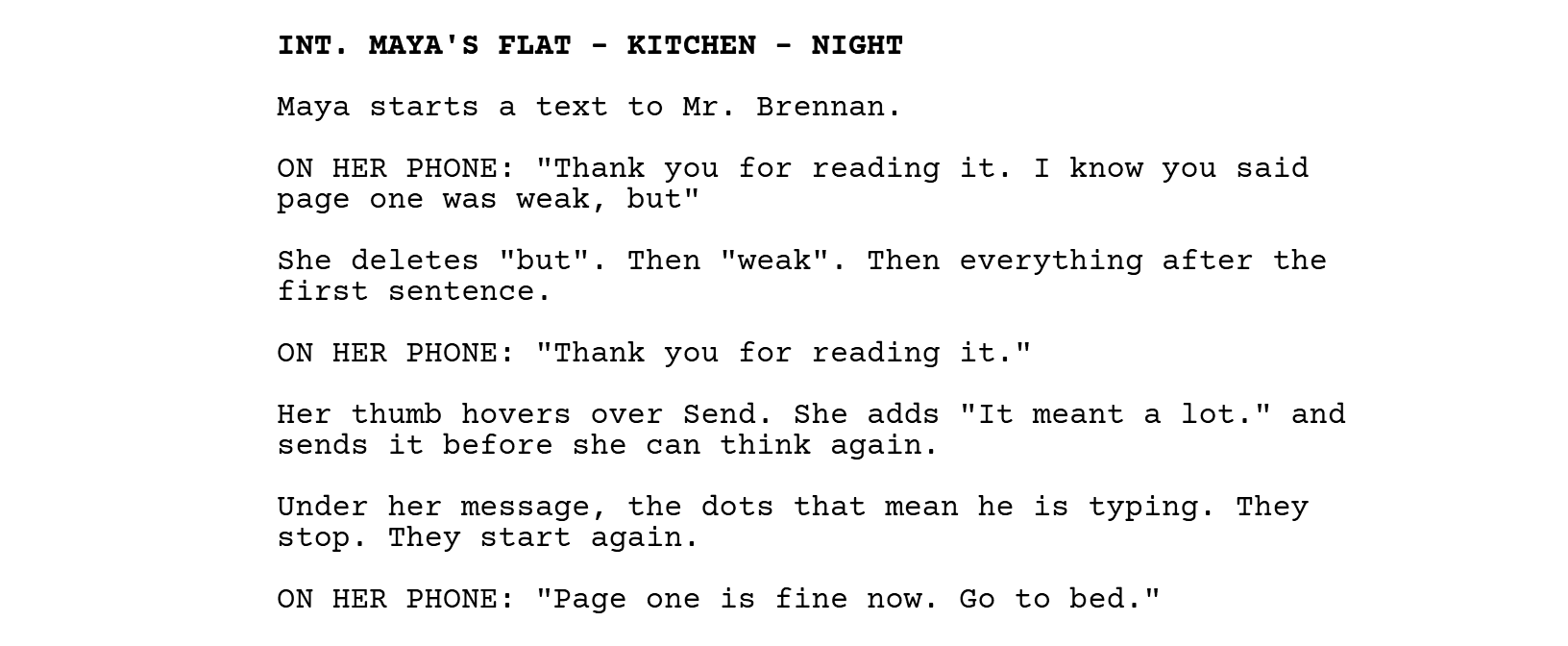
Strikethrough is tempting for the deleted words. It is also easy to miss on paper, and the Fountain format has no mark for it, so a script that moves between programs can lose it on the way. An action line such as She deletes "but" reads the same in every program and on every printout.
Group chats
A group chat has more voices than a reader can sort out from quotation marks. Name the group once in the action and set the messages as dialogue with (TEXT) cues. Three or four messages give the feel of a chat, and the reader will happily imagine the other forty, so stop well before anyone starts counting.
When the chat itself is the joke, describe its shape and leave the messages out: LA FAMILIA has 41 unread messages. Rosa has sent the same photo of the script four times, each with a different caption.
Emojis
Describe them in words. Screenplay fonts are made for typewriter letters, so an emoji pasted into a script may turn into an empty box in another program or on paper, and even where it shows, it looks different on every make of phone. Inside a message, put the description in square brackets, "see you sunday [thumbs-up]", or move it into the action.
A single emoji can be the whole reply, and a loaded one. Maya tells the family group she is a finalist, and Rosa, who has told half of Madrid about the script, answers with one thumbs-up. Put that in a plain action line and let Maya's face do the rest.
Keeping it readable
- One layout for each kind of message. If texts are dialogue and emails are inserts on page 10, they should still be on page 80, so that a change of layout never looks like a change of meaning.
- Give the actual words. She texts that she is running late hides the message, while
"running late x"shows it, and the kiss at the end tells the reader something too. When the words really don't matter, say so: A string of texts from Leo, all ignored. - Keep messages short. People read more slowly than they listen, and a long message on screen holds the film still while everyone catches up.
- Make the sender plain. A cue does it, and so does the contact name at the top of the screen.
What the production does with it later
Everything on a screen in a film is designed by someone. A graphics team builds what appears on the phones and laptops, and the apps are usually invented, because a real app's name and look need permission and an invented one won't date the film or advertise somebody else's product. Some screens are played live on set; many are added afterwards, over a phone that showed nothing while the camera rolled.
For the writer, that means naming what the audience needs to see and leaving the rest. A messaging app is easier to make than a named one, and a phone number in a message will be swapped for one set aside for fiction. The editor decides how long each message stays on screen, which is one more reason to keep them short.
Download the examples
Leo's texts, the exchange at night, the finalist email and the message Maya rewrites, gathered into one short script. Print it on US Letter or A4, or open it in your screenwriting program.
The examples
The four examples on this page as one short script.
Questions
Should text messages be in italics?
They can be, alongside the quotation marks, though no rule asks for it. The quotation marks are what readers rely on.
Is it (TEXT) or (TEXTING)?
Either. Readers know both, so the choice is yours.
Do I need BACK TO SCENE after an insert?
If the scene carries on in the same place, yes, because it tells the reader the close view is over. A new scene heading also ends an insert, so you don't need both.
How do I write a text in another language?
The way you would write dialogue in another language. Give the words in English and say what the audience sees: A text from Rosa, in Spanish, subtitled: "Did you eat?" If the audience shouldn't understand it, write it in the original language and say there is no translation.
Can a whole film be told through screens?
Yes. Searching (2018) plays out almost entirely on computer and phone screens, and Host (2020) on a single group video call. In a script like that the screen is the location, and everything on this page applies on every page. The phone calls page covers video calls.
Sources and further reading
- Dave Trottier, Ask Dr. Format: Texts, IMs, E-mails, Skype and More, Script magazine, 2019, which sets out several layouts for messages and screens.
- Christopher Riley, The Hollywood Standard, on inserts and superimposed titles.
- Our guide to screenplay format, on texts, inserts and words on screen, and the glossary for INSERT, SUPER and CHYRON.
Write it formatted from the first line
Scriptopus sets every line as you type, keeps the beat board and the treatment beside the script, and exports the PDF and Final Draft file you will need. The editor is free on Mac and Windows.
- Every element in its place, with Tab, Enter and Ctrl+1 to 6.
- Beat Board, Treatment and Synopsis in the same project as the script.
- Six title page layouts, Industry Standard first.
- PDF, Final Draft, Fountain and Celtx exports.